How to Design the Perfect Auto Attendant: 5 Flowcharts & Script Templates
Stop confusing your callers. Use these 5 auto attendant script examples and visual phone tree flowcharts to design a professional, efficient caller journey.
We have all experienced "IVR fatigue." You call a business, and before you can even state your purpose, you are trapped in a labyrinth of confusing options, robotic voices, and endless menus that seem designed to prevent you from speaking to a human being. Eventually, you get frustrated and hang up.
If that’s happening to your business, you are losing revenue before the phone even rings on a desk.
Your Auto Attendant (also known as an IVR or Interactive Voice Response) is your company’s digital front door. It is the very first impression a caller gets. A well-designed auto attendant sounds professional, routes calls efficiently, and respects the caller's time. A poorly designed one screams "amateur" and drives prospects to your competitors.
Most guides on the internet just give you lists of text to copy and paste. But an effective phone system isn't just words; it's architecture. You need to visualize the path the caller takes before you write the script.
In this guide, we aren't just giving you auto attendant script examples. We are giving you the blueprints. Below are five common business scenarios, complete with visual flowcharts showing the call logic, and the exact scripts you need to bring them to life.
The Golden Rules of Auto Attendant Design Before we dive into the templates, we need to establish the rules of engagement. To ensure your callers have a smooth experience, follow these best practices when designing your flowcharts:
1. The "Rule of 3" (or 4 max) Do not offer callers seven different options in the main menu. Human short-term memory is limited, especially when auditory. Stick to the three or four most critical paths (e.g., Sales, Service, Billing, Hours). If you need more, bury them in a sub-menu.
2. Action After Function Don't say: "Press 1 for Sales." Do say: "For Sales, press 1." Why? By stating the function first, the caller identifies that it applies to them, and then listens for the action required. It’s a small psychological tweak that reduces menu repeats.
3. Prioritize by Volume What do 80% of your callers want? If most people are calling to schedule an appointment, do not make that "Option 5." Put the highest volume requests first.
4. Always Offer an Escape Hatch Sometimes, the menu just doesn't fit the caller's needs. Never trap them in an endless loop. Always offer an option (usually "0") to speak to an operator or receptionist during business hours.
Template 1: The "Small Business Standard" This is the classic structure for most small-to-medium businesses (SMBs). It covers the basics without overwhelming the caller. It assumes you have distinct departments for sales and support, and a general mailbox for everything else.
The Flowchart Blueprint
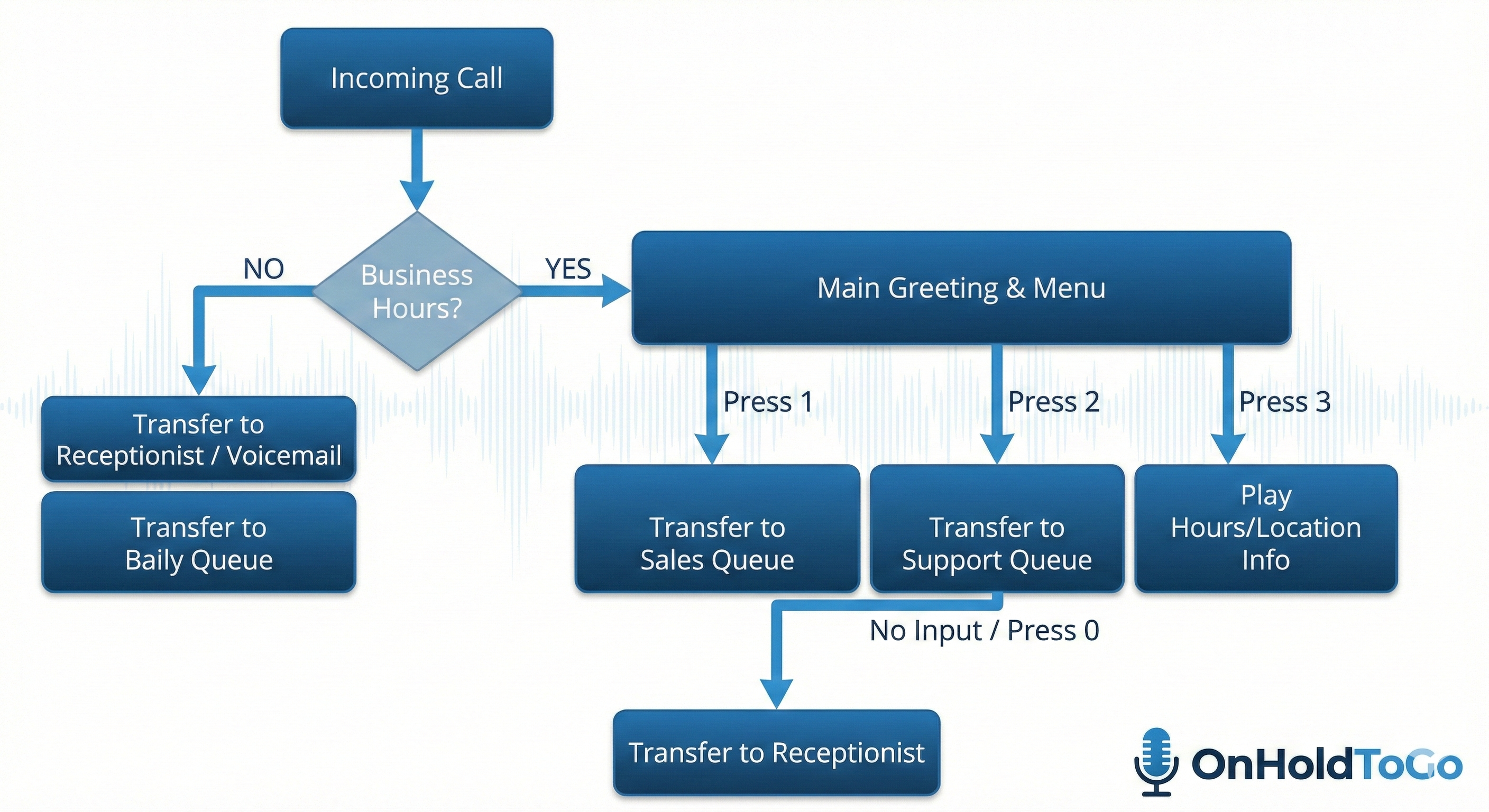
"Thank you for calling [Company Name], the leader in [Brief Mention of Service]. To ensure we route your call correctly, please listen to the following options.
For Sales or new inquiries, press 1. For existing client support or billing questions, press 2. To hear our business hours and location, press 3. If you know your party’s extension, you may dial it at any time. For all other inquiries, press 0 to speak with the next available team member."
Sub-Menu (If they press 3 for Info):
"Our office is located at [Address]. We are open Monday through Friday, from 9 am to 5 pm Eastern Time. To return to the main menu, press the star key."
Template 2: The Service or Trade Business (Booking Focus) If you run an HVAC company, a plumbing service, or a salon, your primary goal is booking appointments. Your auto attendant should reflect this priority. Don’t bury the lead—make booking the very first option.
The Flowchart Blueprint
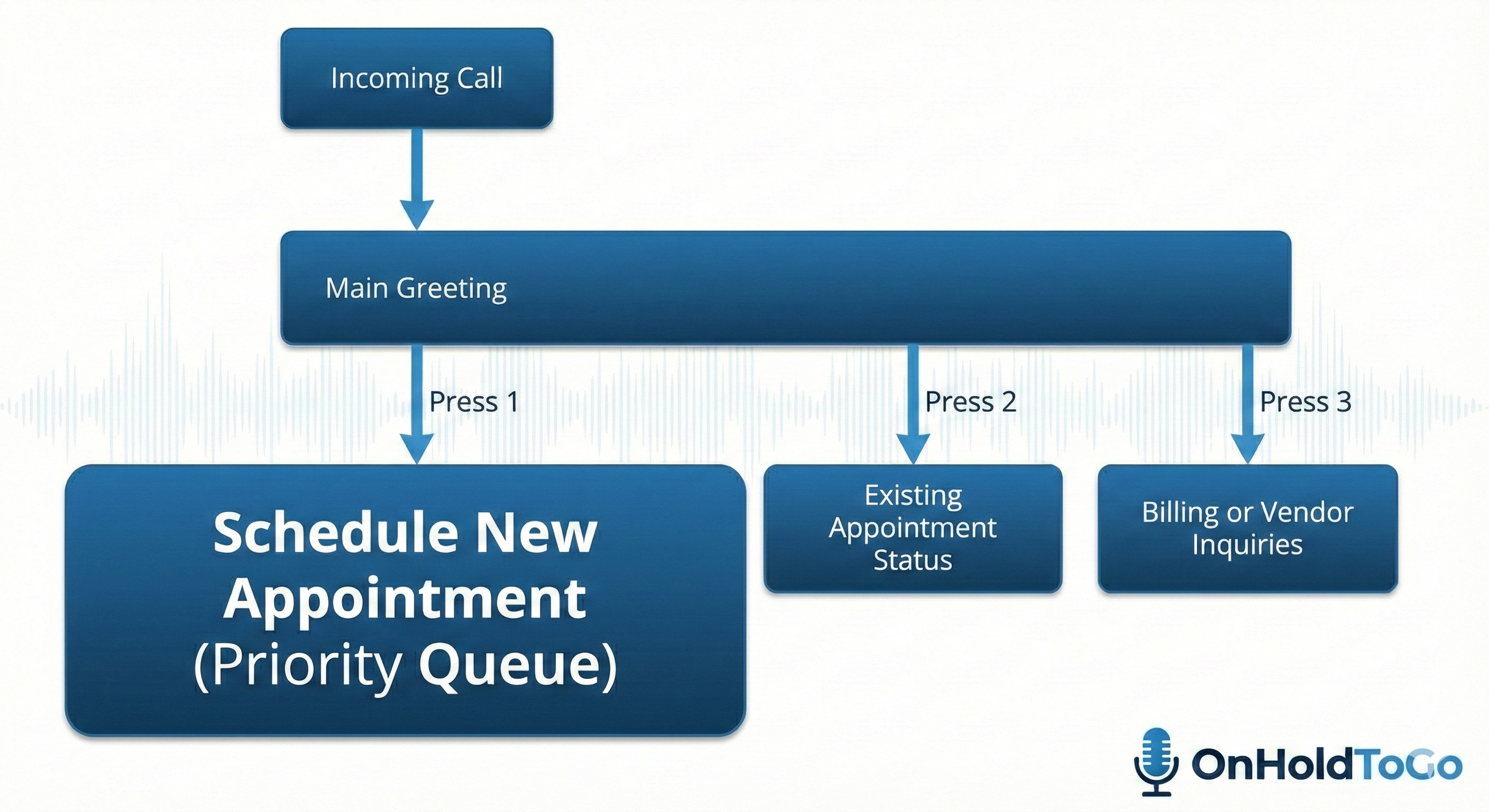
"You’ve reached [Company Name]. We’re happy to help get your service scheduled.
To schedule a new appointment or get a quote for a new project, please press 1 right now.
To check the status of an existing appointment, or to reschedule, press 2. For billing questions or vendor inquiries, press 3. To repeat this menu, press the pound key."
Template 3: The Professional Services Firm (Law, Accounting, Consulting) In professional services, clients often have a dedicated relationship manager, attorney, or accountant. These callers don't want "departments"; they want specific people. The structure here needs to emphasize a directory.
The Flowchart Blueprint

"Good morning and thank you for calling [Firm Name].
If you know the extension of the person you are trying to reach, you may dial it now.
To use our dial-by-name directory, please press 1. If you are a new client seeking representation or consultation, please press 2. For general administrative questions, press 3. To speak to the reception desk, press 0."
(Note: You will need a separate, very brief prompt for the Dial-by-Name directory, usually built into your phone system, such as: "Please enter the first three letters of the person's last name using your keypad.")
Template 4: The Medical or Dental Practice (Compliance Focus) Healthcare providers have unique requirements. You must address emergencies first for liability reasons, handle HIPAA-sensitive information carefully, and route prescription requests efficiently to free up front-desk staff.
The Flowchart Blueprint
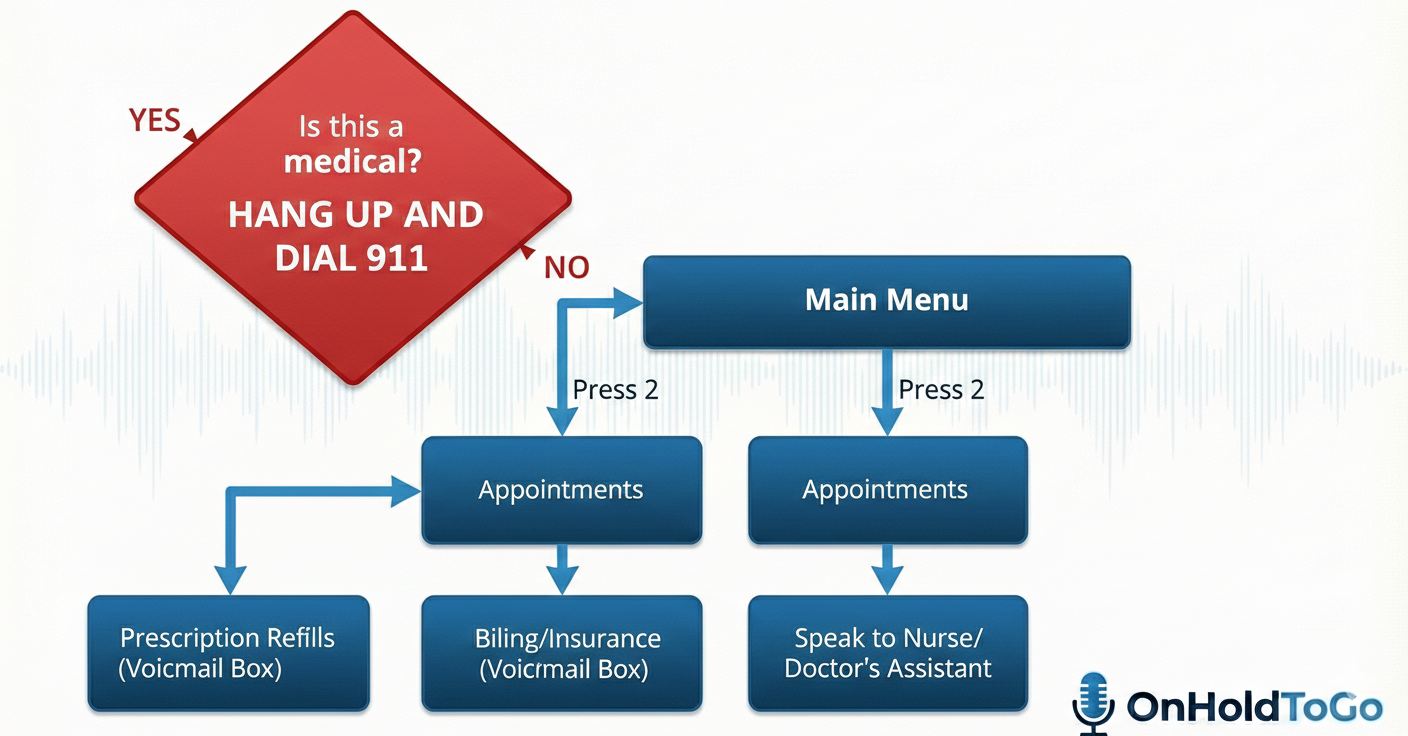
"Thank you for calling [Practice Name]. If this is a medical emergency, please hang up and dial 911 immediately.
For all non-emergency calls, please listen carefully as our menu options have recently changed.
To schedule or change an appointment, press 1. For prescription refills, press 2. Please have your pharmacy phone number ready. For billing or insurance questions, press 3. To leave a confidential message for a nurse or physician’s assistant, press 4."
Template 5: The After-Hours & Holiday Router Your business runs 24/7, even if your staff doesn't. Your after-hours auto attendant is crucial for capturing leads and managing expectations when the office is closed. This isn't so much a "tree" as it is a professional dead-end that guides them to the next step.
The Flowchart Blueprint
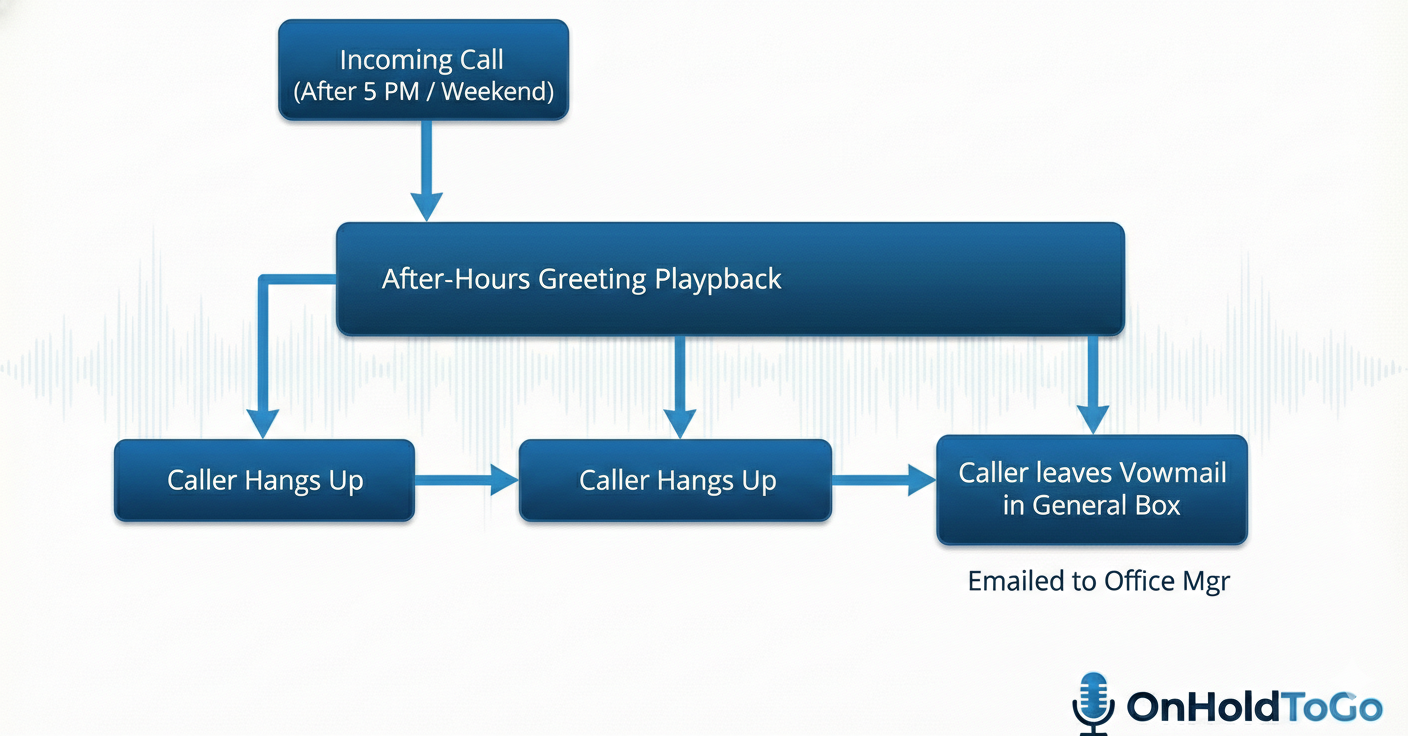
"Thank you for calling [Company Name]. Our offices are currently closed. Our normal business hours are Monday through Friday, 8 am to 5 pm.
Please leave a detailed message after the tone, including your name and phone number, and we will return your call on the next business day. If you are calling regarding an existing service contract with 24-hour support, please dial [Emergency Number] now. Thank you."
Beyond the Script: Why the Sound Matters You now have the blueprints and the words. You have designed the perfect caller journey. But your job isn't finished.
The biggest mistake businesses make after designing a great auto attendant is executing it poorly. They have someone in the office record it on a speakerphone, or worse, they use a robotic, synthetic text-to-speech voice.
Your auto attendant is the voice of your brand.
A grainy, echoing recording made by "Bob in accounting" tells callers that your business cuts corners. A robotic voice tells callers that you don't offer personalized service.
If you have taken the time to design a professional flow, you need a professional voice to deliver it.
At OnHoldToGo, we turn these scripts into polished, studio-quality audio productions. Our roster of professional voiceover artists gives your business the credibility it deserves the moment a customer calls. Don't let a DIY recording ruin your perfectly planned caller experience.
Are you ready to make your business sound as professional as it is? Browse our voice talent samples today and let us bring your auto attendant script to life.
Danger Zone Deleting this post will remove all associated images and data permanently.